
Improve Productivity and Act Proactively with Microsoft Copilot
Business continuity hinges on a company’s ability to respond quickly and efficiently, and generative AI is becoming an indispensable tool to accomplish that. With the introduction of Microsoft Copilot embedded in Dynamics 365 Supply Chain Management, supply chain users can now benefit from conversational AI capabilities and be more productive with a level of accuracy that wasn’t before available.
This level of responsiveness helps drive resilience and ensure supply chain continuity even in the most volatile conditions. Copilot is truly redefining the art of the possible and revolutionizing how ERP users engage with technology every day.
What Does Copilot Do in Supply Chain Management?
Copilot is built into Dynamics 365, meaning it can seamlessly integrate with existing workflows with minimal configuration and setup. With that integration, Copilot can leverage all your ERP data to provide contextually accurate responses for better decision-making.
With Copilot in-product help, users can get answers, insights, and solutions without leaving their browser tab. For example, you can ask Copilot to “forecast next quarter’s demand for product x” and receive instant, data-driven responses. Or you could request real-time updates on supplier performance, making it easier to manage and mitigate disruptions.
Let’s look at some specific ways AI and Microsoft Copilot in Dynamics 365 Supply Chain Management can drive new ways of working for supply chain professionals.
Supercharge Demand Planning
Demand planning and forecasting in Dynamics 365 goes beyond basic trend analysis by leveraging advanced algorithms and machine learning models in Azure. These models detect patterns in historical sales, seasonality, and external signals—such as promotional activities, weather data, or economic indicators—to generate more accurate and dynamic forecasts.
As an example, a retailer might use Dynamics 365 Supply Chain Management to automatically analyze two years of sales history for winter coats, correlate it with upcoming seasonal weather forecasts, and factor in social media sentiment around new fashion trends. The system then generates a demand forecast for the next six months and automatically recommends adjusting raw material orders, workforce shifts, and production schedules to avoid stockouts or excess inventory.
All these recommendations can be configured to flow seamlessly into the planning and execution tools within Dynamics 365, ensuring that the supply chain is optimized to meet projected customer demand.
The global predictive analytics market is experiencing significant growth. According to BCC Research, it was valued at $11.1 billion in 2022 and is projected to reach $23.9 billion by 2027, reflecting a compound annual growth rate (CAGR) of 16.5%.
What Copilot Adds
Copilot provides a new level of insight for demand planners with in-product guidance, forecasted insights, and the ability to explore trends, anomalies, and influencing factors in natural language.
Planners can query the system by asking questions like “Why is this variance occurring?” or “What is causing this shipping delay?” and Copilot will respond. This in-context advice helps planners make more informed decisions and improve forecast accuracy.
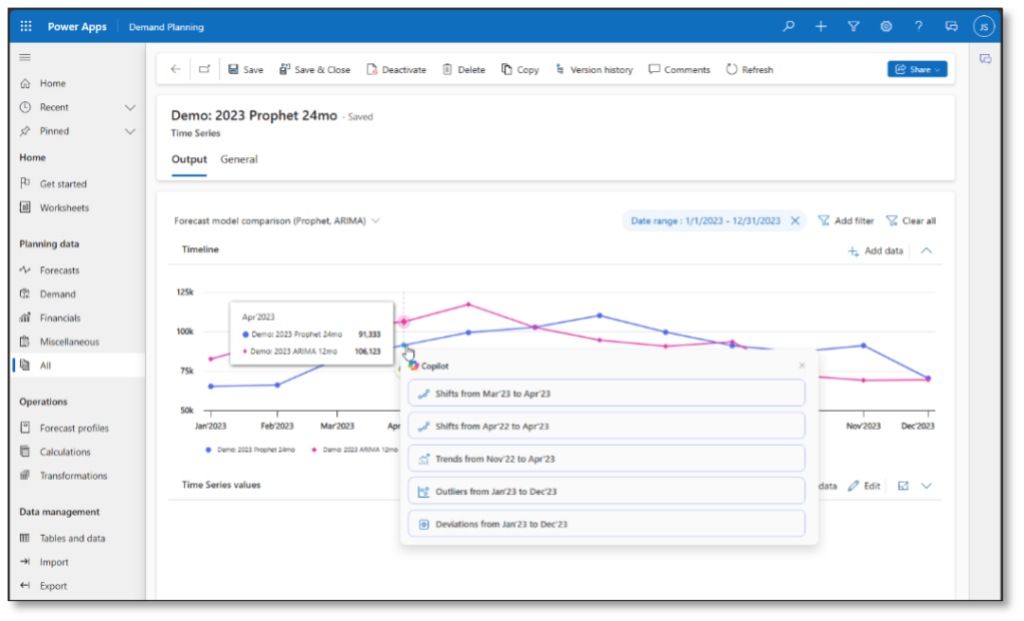
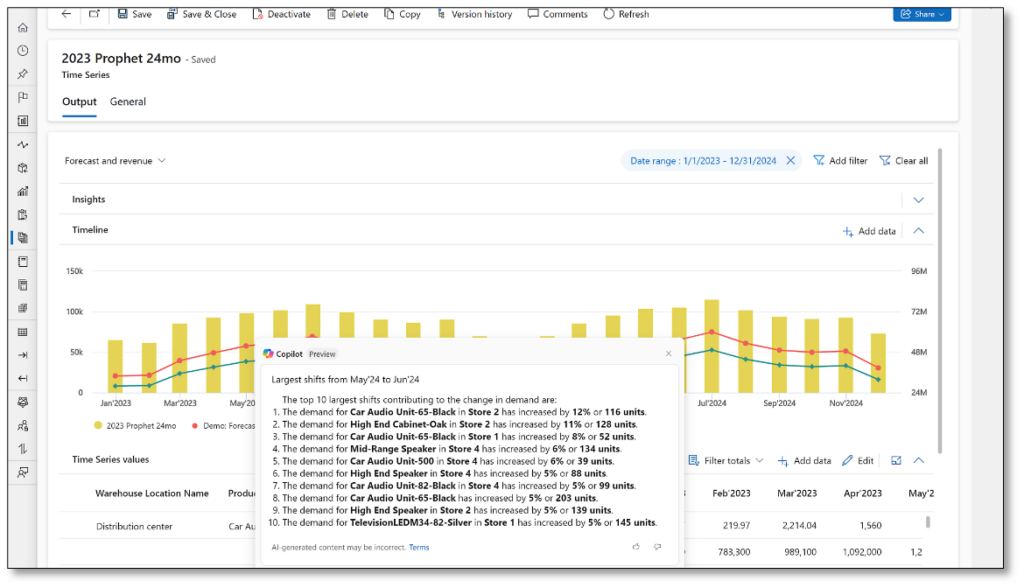
For example, let’s say a demand planner is interested in learning the most significant factors that contributed to a notable shift between two consecutive periods. The planner opens the relevant worksheet, selects a point of interest on the chart, and then selects a predefined question to ask Copilot. The app then provides answers in real time.
Adapt and Make Real-time Adjustments
Dynamics 365 allows you to swiftly pivot operations and make real-time adjustments: With Power Automate or Azure Logic Apps you can schedule and automate data pulls, and with Azure AI Services and NLP, you can configure specific keywords or topics (like severe weather events, geopolitical tensions, or major financial announcements) to trigger automated alerts when relevant news is detected. Once flagged, the insights are correlated with your supply chain data using Microsoft Fabric and Power BI to provide actionable recommendations like rerouting shipments through unaffected carriers or adjusting production timelines.
What’s New for 2025?
Microsoft continues to enhance AI capabilities across Dynamics 365 Supply Chain Management. New features rolling out in 2025 include:
- AI-powered root cause analysis: Uses machine learning to analyze historical and real-time operational data—such as order histories, shipping logs, and vendor metrics—to identify common causes behind late shipments or fulfillment issues. Instead of manually tracing delays, planners can ask Copilot to surface root causes and receive prioritized explanations and recommended mitigations.
- Scenario-based planning using natural language prompts: Supply chain managers can now explore “what-if” scenarios using plain language questions like, “What happens if demand spikes by 20% next month?” or “How would supplier X going offline affect our production schedule?” Dynamics 365 runs simulations based on current inventory, capacity constraints, lead times, and production dependencies to help evaluate trade-offs and adjust plans.
- Connected insights across Power BI and Microsoft Fabric: This integration enables full-lifecycle supply chain visibility by unifying data across planning, sourcing, production, and distribution. Fabric ensures reports are refreshed in near real-time, and users can ask Copilot to summarize patterns, flag anomalies, or generate visualizations, without needing to build reports manually.
These additions expand Copilot’s ability to connect internal and external signals, helping teams act faster and smarter with fewer manual steps.
Get the Right Information at the Right Time
Supply chain visibility gets crystal clear when AI integrates data from multiple sources── suppliers, logistics partners, and IoT devices. Then, with Dynamics 365, those data streams can be consolidated into a single dashboard so you can monitor every stage of the supply chain from procurement to delivery.
Copilot takes those dashboard insights a step further with summaries, or additional insights that are displayed when you hover over a data item. Each summary gives you a quick and customized overview of the most important information related to the selected data.
Copilot can understand and prioritize information based on your intent or role, ensuring that each summary is highly relevant and focused. It highlights critical attributes, dimensions, and field values selected for their relevance to your individual needs. For example, the information can vary based on other pages you use most often, and it only includes details that you can normally view based on your security roles and permissions.
Summaries are available for:
- Purchase Orders
- Sales Orders
- Products
- Warehouse Workers (via the Warehouse Management mobile app)
Intelligent Process Automation
AI-powered automation in Dynamics 365 goes beyond simple task repetition to orchestrate more complex supply chain processes. For example, if you are a procurement professional, Dynamics 365 can analyze historical purchase data, vendor performance scores (like lead times, defect rates, on-time delivery percentages), and current market conditions. Based on thresholds—price targets or quality metrics—the system can automatically suggest or initiate purchase orders.
Additionally, Dynamics 365 can keep a continuous log of shipping performance metrics and use machine learning to predict potential delivery bottlenecks. When risk thresholds are exceeded, the system automatically flags deliveries or recommends alternate shipping carriers.
Looking Forward with Copilot
Microsoft is actively working on harnessing Copilot’s generative AI and advanced natural language processing to make automation in Dynamics 365 available. With its conversational interface, supply chain managers will simply type or speak directives like, “Place an order for 10,000 microchips at the best available price,” and Copilot will interpret and execute the request.
Or, if a manager wants to adjust an existing workflow—such as changing vendor criteria or lead-time constraints—they will describe it in plain language. Copilot will update underlying logic in Dynamics 365’s workflow engine.
Microsoft Dynamics 365 FSCM now includes the Supplier Communications Agent, an AI-powered Copilot feature that automates routine supplier interactions. It can draft and send follow-up emails for unconfirmed or delayed purchase orders, interpret incoming vendor emails, and suggest updates to purchase orders.
While not fully autonomous yet, the agent significantly reduces manual effort, allowing procurement specialists to focus on strategic supplier relationships and improving supply chain resiliency.

The Bottom Line
AI is revolutionizing supply chain management in Dynamics 365 by enabling smarter decision-making, enhancing operational efficiency, and reducing costs. The addition of Microsoft Copilot for Dynamics 365 takes AI benefits even further by introducing intuitive, conversational AI capabilities that simplify complex processes and enhance user productivity.
By leveraging these AI-driven tools, your organization can stay ahead in today’s fast-paced, competitive environment. Whether you are a retailer, manufacturer, or distributor, AI and Copilot are defining new ways of working for supply chain professionals.
If you’re interested in learning how your organization can take advantage of Dynamics 365 Supply Chain Management and its revolutionary AI tools, reach out to us at JourneyTeam.
Or join us for a demo or funded assessment to see how Copilot can solve your unique challenges.
FAQs About Copilot and AI in Supply Chain
Copilot is built into the latest versions of Dynamics 365 Supply Chain Management. Some features may require an active Microsoft Copilot license or premium AI add-ons, depending on your subscription level.
Yes. You can tailor Copilot prompts, summaries, and automation rules based on roles, permissions, and workflows. Microsoft also provides admin tools to manage AI usage.
No. Copilot enhances your existing tools with natural language access, smarter recommendations, and more dynamic responsiveness. It works alongside what you already have in Dynamics 365.
Manufacturers, distributors, and retailers with complex logistics, global supply networks, or demand volatility benefit significantly from the real-time responsiveness Copilot enables.
Microsoft applies enterprise-grade security and compliance frameworks across all Copilot features, including data governance controls and role-based access.