How do you know if your field service operation is really built for growth? These days, it’s not just about having more technicians or trucks on the road—it’s about using what you already have more effectively.
That’s where tools like Microsoft Dynamics 365 Field Service come in. With automation, AI-powered scheduling, IoT connectivity, and mobile tools, service companies are finding smarter ways to scale without overloading their teams.
The five metrics we cover below tell that story. They show you where to save time, boost visibility, and create better customer experiences. And as the pressure grows to deliver faster, more responsive service, these are the numbers that can help you stay ahead—and scale with confidence.
1. Time To Invoice
Dynamics 365 Field Service can help you eliminate delays through native automation. When a technician completes a job in the mobile app, the system can instantly generate and send an invoice, pre-populated with customer data, service details, and materials used. It not only saves time but also reduces errors by pulling directly from field data.
How quickly can you turn completed jobs into invoices? For many service organizations, invoicing lags behind service delivery by days—sometimes even weeks. This creates bottlenecks in cash flow, complicates accounting, and frustrates customers who rely on timely documentation.
At JourneyTeam, we recently worked with an automotive service provider, ProTech Automotive Solutions. ProTech witnessed dramatic improvements in their invoicing efficiency after implementing Dynamics 365 Field Service. A manual invoicing process that previously took up to two days per job is now almost instantaneous. With automation, ProTech has cut turnaround time by more than 90 percent.
2. Digital Intake Ratio
Your intake process sets the tone for your entire service cycle. A high digital intake ratio—meaning a majority of requests come through portals, apps, or bots instead of calls and emails—enables your team to move faster and smarter.
If you’re using an intake portal, Dynamics 365 Field Service integrates with Microsoft Power Apps providing the flexibility to build custom intake experiences. Whether it’s a self-service appointment scheduler, an embedded form on your website, or a chatbot powered by Azure AI, each intake channel can capture and funnel requests seamlessly.
When we worked with ProTech, we helped them transition from eight fragmented intake channels to a single portal that routes requests into Dynamics 365. It helped reduce their monthly processing time from 6,200 hours to under 1,000. Beyond saving time, it allowed the company to scale their services without adding administrative staff.
3. Technician Admin Time vs. Billable Time
When a technician spends hours each week on administrative tasks—logging hours, writing reports, updating spreadsheets—it’s time that doesn’t generate revenue.
With the Dynamics 365 Field Service mobile app, field technicians can receive real-time assignments, update job status, scan barcodes, capture customer signatures, and even submit timesheets—all in one place. Dynamics is optimized for offline situations to ensure that work can continue even without a reliable connection.
Because the functionality is tightly integrated, it really transforms how technicians work. They can be more productive, make fewer errors, and deliver a more professional experience. ProTech saw technician productivity improve by 30 percent when they eliminated manual reporting by using Dynamics 365’s mobile features.
4. Dispatch Efficiency Rate
Every field service leader knows the pain of inefficient dispatching: techs stuck in traffic, mismatched skillsets, or delayed arrivals. All these issues cost time, cut into margins, and frustrate customers. That’s where Dynamics 365’s Resource Scheduling Optimization (RSO) comes in.
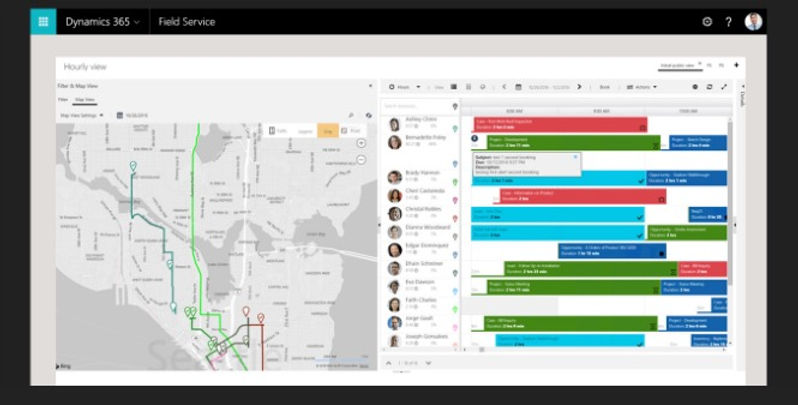
RSO uses AI to factor in technician availability, location, skillset, certifications, and job urgency to automatically assign the right person to the right job at the right time. Dispatchers have real-time visibility into technician locations and job statuses, so they can intervene when necessary.
Think of the results: faster dispatching, more efficient routing, and fewer appointment windows missed. Microsoft has reported efficiency improvements of up to 25 percent when companies use AI-assisted scheduling. It’s a must-have if you’re a growing company that manages distributed teams and increasing job volumes.
5. Service Request Completion Velocity
The speed at which jobs can be completed is the heartbeat of any field service operation because it captures how quickly your team can move from service request to job completion. A slow speed means higher labor costs, lower customer satisfaction, and fewer completed jobs per day.
With Dynamics 365 Field Service, it’s easier to track processes and pinpoint bottlenecks because you have visibility across the entire job lifecycle. From automated intake to optimized dispatch and streamlined technician workflows, every step is connected, and real-time dashboards and reports give managers the insight they need to make adjustments at the point they are necessary, not retroactively.
BCG reports that companies using integrated field service platforms can complete standard service calls 35 percent faster. And that translates into more jobs per day, happier customers, and a workforce that can scale without burnout.
Protech’s Incredible Field Service Transformation
See how Protech Automotive Solutions slashed 6,200 hours of manual work and eliminated scheduling chaos by automating field operations with Microsoft Dynamics 365. Discover how a mobile-first strategy empowered technicians, streamlined dispatching, and accelerated invoicing—all while boosting customer satisfaction.
Going Beyond the Metrics: Strategic Features That Enable Growth
These metrics are just the beginning. Dynamics 365 Field Service has a range of features that help service-driven organizations grow sustainably:
Internet of Things (IoT) Integration
With IoT sensor and connected device integration, Dynamics 365 Field Service can remotely monitor equipment health and usage patterns, triggering automated service tickets as soon as something deviates from normal. It reduces downtime when field teams can arrive onsite with all the information they need.
Customer Communications
Keeping customers informed is essential to maintaining satisfaction and reducing missed appointments. With automated communication flows, including technician ETA alerts, real-time job status updates, and post-service surveys, Dynamics 365 is a valuable tool. You can also customize communication channels—whether SMS, email, or within a portal—to communicate with your customers in their preferred method.
Knowledge Base Integration
Field technicians often encounter unique or unfamiliar issues on the job. On-the-go access to a knowledge base can be integrated directly into the Field Service mobile app, and include diagnostic guides, video walkthroughs, or company-specific troubleshooting workflows. When technicians have self-service resources, you reduce the need for escalations and improve first-time fix rates.
Work Order Management
Dynamics 365 allows businesses to build standardized, repeatable service task templates. You can auto-generate checklists based on work order types, ensuring technicians complete every step required for safety, compliance, or quality assurance. Actions are tracked in real time, creating a verifiable service history. This is especially valuable in regulated industries where audits and documentation are mandatory.
Inventory & Asset Tracking
Field service operations depend on knowing which tools, vehicles, and parts are available, and when and where they’re needed. With built-in inventory management, Dynamics 365 provides real-time tracking of parts usage, van stock levels, and asset assignments. Teams can restock proactively and transfer parts between locations seamlessly, reducing delays and improving job completion rates.
Bringing It All Together
To drive scalable service growth, you need more than disparate point solutions. Because Field Service is built on a single platform that natively connects with Microsoft 365, Power Platform, and Dynamics 365 Sales and Customer Service, your service operations aren’t just optimized— they’re part of a broader ecosystem designed for growth and efficiency. Whether you’re managing 10 jobs a day or 10,000, the key lies in integration, insight, and a platform designed to evolve with your business.
Start a Conversation
Find out what JourneyTeam and Dynamics 365 Field Service can do for your business.