Cloud contact centers are evolving at lightning speed as customers expect more tailored and efficient engagements, and social media channels have a more direct effect on customer interactions. In fact, the cloud-based contact center market is expected to quadruple by 2030, according to Maximize Market Research.
And no company is more in the game than Microsoft, with Dynamics 365 Contact Center. It represents a significant step in Microsoft’s efforts to provide a comprehensive, AI-driven customer service solution that can work with any CRM system, positioning it as a true Contact Center as a Service (CCaaS) offering.
Let’s back up for just a minute.
What is Contact Center as a Service (CCaaS)?
Contact center as a service (CCaaS) is a suite of tools and cloud-hosted services that include intelligent call routing, comprehensive communication channels, agent management, and analytics. The behind-the-scenes technology manages all incoming and outgoing client calls and phone, email, SMS, social media, and online communications.
A modern CCaaS also integrates AI tools that companies can use to find patterns, boost customer satisfaction, and increase operational effectiveness. They also have disaster recovery and redundancy built in, guaranteeing continuous operation even in the event of hardware malfunctions or outages. Sustaining consumer satisfaction and business continuity depends heavily on this resilience.
Don’t Get Confused…
Contact Center is a native Dynamics 365 application that can work in tandem with Dynamics 365 CRM solutions. Dynamics 365 Customer Service provides foundational service capabilities, and Dynamics 365 Contact Center expands these with advanced functionalities, deeper AI integration, and more robust omnichannel communication tools.
It’s important to note that Dynamics 365 Contact Center builds on top of Customer Service but does not replace it. You need a Customer Service license as a prerequisite to use Contact Center, since Contact Center adds voice and advanced omnichannel capabilities on top of the core service functionality.
Works with Other CRMs Too
One of Dynamics 365 Contact Center’s biggest highlights is that it can be used with other CRM platforms, like Salesforce and ServiceNow. With Contact Center APIs, you can build and reuse connectors to other CRM systems, including those that may have been custom built.
What You Get
Microsoft describes Dynamics 365 Contact Center as a Copilot-first contact center solution that delivers AI capabilities to every customer engagement channel. Here’s what that looks like.
Unified Telephony and Omnichannel Capabilities
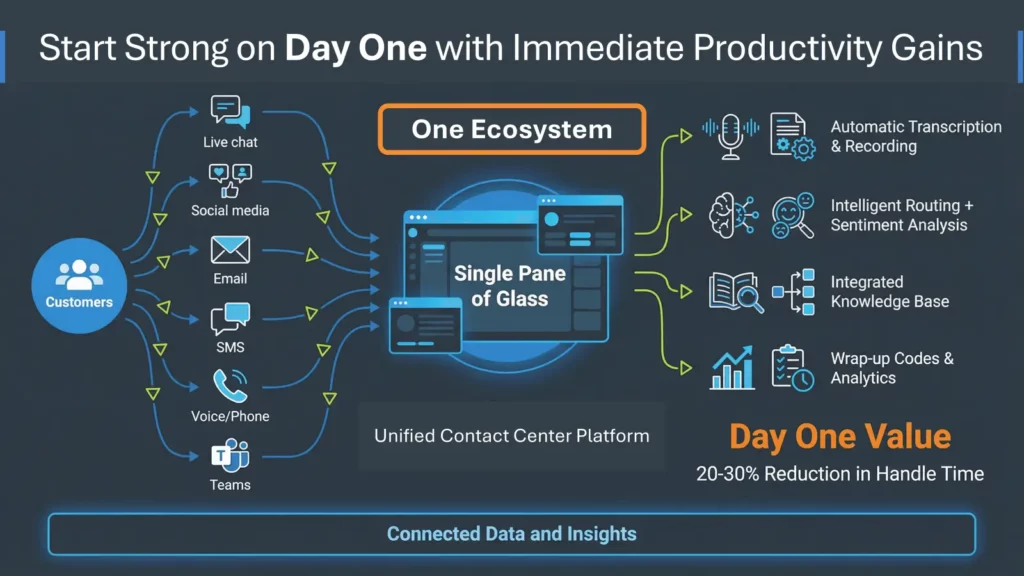
While Dynamics 365 Customer Service has some omnichannel features, Contact Center provides more comprehensive support for all communication channels, including voice, through Microsoft Telephony and interactive voice response (IVR) systems. That means incoming calls can be handled in conjunction with other channels of inquiry (email, web, SMS, social media).
AI-infused Intelligent Customer Service
AI and automation save both customers and service reps an enormous amount of time and can help business owners save some serious money on the costs associated with customer service.
Let’s take a scenario where inquiries are flooding into a Dynamics 365 Contact Center. As queries come in regardless of channel, the system intelligently routes customers to reps with the right language skills and product expertise.
At the same time, supervisors can track call volumes and sentiment in real-time, adjusting staffing or intervening in challenging calls as needed. You can also set up automated responses that let customers know that their message has been received, include links to self-help guides, or even provide an estimated wait time.
Scalability and Integration Flexibility
The Dynamics 365 Contact Center platform accommodates seasonal or surging demand. It automatically adjusts to changes in contact volume, agent counts, wait times, and service levels without performance impact. As your company grows, it can easily scale, adding new users, channels, or features as needed.
Plus, with Microsoft’s unified ecosystem, Power Platform for automation and workflows, and Microsoft Fabric for advanced analytics and reporting, you get full-service visibility and AI-assisted decision-making across departments.
Copilot on the Desktop
One of Contact Center’s most innovative features is real-time assistance directly within the service rep’s workspace, provided by Microsoft Copilot, with AI-driven prompts, knowledge search, and collaboration tools. From auto-summarizing interactions to generating customer follow-up messages, Copilot reduces manual tasks and gives service reps more time to focus on customer outcomes.
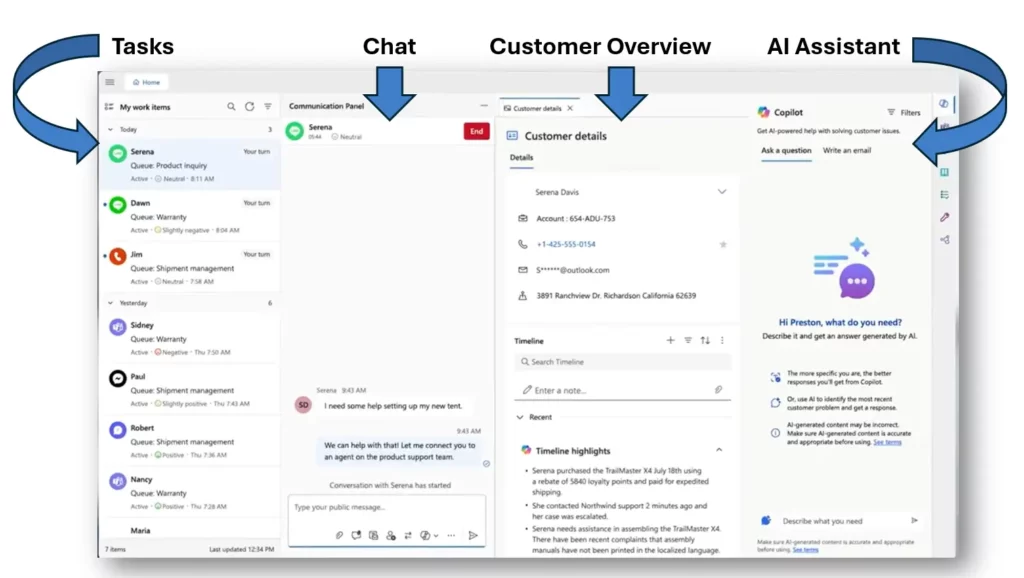
Copilot Agents built in Microsoft Copilot Studio can also be used to create custom agents that handle common requests, such as password resets or appointment scheduling, reducing the load on live service reps.
If you are a supervisor running a customer service department, Dynamics 365 Contact Center provides some great visual tools for supervisors, including contact center health monitoring, service rep performance tracking, and AI-generated suggestions for coaching.
AI, Telephony, and Workforce Management in Dynamics 365 Contact Center: A New Era in Customer Service

Learn how Dynamics 365 Contact Center can be used effectively in your organization (large or small) to drive revenue and increase satisfaction.
Contact Center Migration Advice
Moving to a modern contact center is less about swapping technology and more about consolidating systems, data, and workflows. Most organizations already have some mix of telephony, CRM, and digital tools in place. The goal is to bring those into a single operating model without losing data, context, or control. Here’s how:
- Legacy → Cloud / AI transition
Start by documenting how calls, cases, chats, and emails move through the business today. Identify which steps are handled by telephony, which live in the CRM, and where agents still rely on spreadsheets, shared inboxes, or manual handoffs.
That baseline makes it easier to decide what should move into the cloud platform first and what can wait for a later phase. If voice, routing, CRM, reporting, and AI are managed as separate workstreams, the contact center may function on paper but still create misroutes, manual wrap-up work, and gaps in customer context. - Data Migration
Before migration, define which records actually need to move: customer profiles, case history, interaction notes, recordings, queue data, and reporting fields. Clean duplicates, standardize formats, and decide how far back historical data should go. Teams should also test migrated records with real service scenarios so agents can confirm that the context they need is available after go-live. - CRM + System Integrations
Map every system that service reps use during a customer interaction, including CRM, order management, billing, field service, knowledge bases, and ticketing tools. Then decide which data needs to appear inside their workspaces and which systems only need background synchronization. The goal is to make sure reps have the right context without switching screens or rebuilding the customer story manually. - Service Rep Onboarding + Training
Train service reps around the work they do every day, not just the features in the platform. Build practice scenarios for taking a call, reviewing customer history, using AI summaries, escalating to a supervisor, and closing the case. Supervisors should also review early interactions after launch to spot workflow gaps and coach agents before small issues become adoption problems. - Change Management
Decide early how queues, routing rules, escalation paths, and supervisor responsibilities will change in the new model. Document those decisions before configuration begins so teams are not debating process changes during testing. It also helps to name department-level owners for routing, reporting, knowledge content, and agent feedback so the platform can keep improving after launch. - Security + Compliance
Review access rules before customer data, recordings, transcripts, and AI-generated summaries are available in the new workspace. Define who can see customer history, who can access recordings, how long data should be retained, and which interactions require masking or restricted access. Security, compliance, and service leaders should agree on these rules before user acceptance testing begins. - Timeline Expectations
Build the rollout around complexity, not just calendar dates. A single-channel deployment with limited integrations may move quickly, while a multi-channel environment with CRM, telephony, reporting, and data migration should usually be phased. Use the first phase to prove routing, call quality, agent workflow, and reporting accuracy before expanding to additional teams or channels. - Risk Mitigation
Create a cutover plan that covers routing validation, phone number testing, fallback procedures, data checks, and agent readiness. Before launch, test the highest-volume customer paths and the exceptions that usually create service issues, such as transfers, escalations, missed calls, and after-hours routing. A good implementation should validate telephony behavior, routing logic, queue performance, and agent workflow under real conditions before launch, so the contact center doesn’t break when demand shifts.
JourneyTeam’s approach is to treat contact center modernization as an operating model, not a one-time configuration project. That means validating how voice, routing, queues, CRM data, reporting, and AI work together before launch instead of assuming each part will perform well just because it was configured correctly.
How Dynamics 365 Contact Center and Copilot Work Together
How Much Does a Contact Center Cost?
The cost of a contact center depends on licensing, agent count, channel mix, call volume, AI usage, telephony setup, implementation scope, and ongoing support needs. For teams comparing contact center pricing or trying to estimate call center cost, it’s important to separate recurring software costs from implementation and usage-based expenses.
It’s different for every organization and can vary by agreement, promotion, region, and purchasing channel – so any initial numbers should be treated as planning benchmarks rather than a final quote.
Pricing Models
Most organizations should plan for three cost categories:
- Recurring software licensing
- Usage-based services
- Implementation effort
Licensing usually includes the core customer service environment, contact center capabilities, and any add-on options for digital channels, voice, or AI-driven automation.
Usage-based costs may include voice minutes, phone numbers, carrier charges, Azure Communication Services, Copilot Studio credits, storage for transcripts and recordings, and capacity tied to Power Platform or analytics workloads.
AI contact center cost can vary depending on which capabilities are enabled, how often they are used, and whether the organization is using AI for agent assist, self-service, summaries, or custom workflows.
Implementation Complexity
Implementation costs are usually driven less by the software itself and more by how much needs to change operationally for each organization. A basic deployment is different from a full omnichannel transformation with data migration, AI automation, analytics, and multiple system integrations.
ROI and Value
The biggest shift in contact center total cost of ownership (TCO) comes from consolidation into one connected Microsoft environment. For budgeting purposes, compare software and implementation costs against the cost of existing tools, support burden, agent productivity, and customer experience gaps.
Take a deeper look at what drives implementation complexity, including telephony ownership, routing design, queue management, KPI planning, and AI readiness with JourneyTeam’s Dynamics 365 Contact Center eBook.
What’s New or Coming in Dynamics 365 Contact Center
Microsoft’s 2026 release wave 1 for Dynamics 365 Contact Center runs from April through September 2026. These updates focus on making the contact center more automated, more connected, and easier to manage day to day.
- AI that handles self-service requests
Instead of only routing every question to a live representative, AI can help answer common questions or complete simple tasks first. For example, a customer could ask about an order status, appointment time, password reset, or billing question through chat or voice. If the issue is simple, the AI agent may resolve it. If it needs a live person, the conversation history can move with the customer, so they don’t have to start over. - More natural voice experiences
One of the most important recent updates is support for real-time voice agents through Microsoft Copilot Studio. These agents can support natural, voice-driven conversations, handle interruptions, switch language dynamically when configured for multilingual use, and carry context forward when a customer needs to be transferred to a service representative. - Better support for live service reps
Once the customer reaches a service rep, AI can help the rep work faster. It can summarize what the customer already said, suggest related knowledge articles, recommend next steps, and help draft follow-up notes. The goal is not to replace the agent, but to reduce the time spent searching, typing, or asking the customer to repeat information. - More useful supervisor visibility
Supervisors are getting better tools to understand what is happening across the contact center. Instead of only seeing queue volume or wait times, they can use AI-supported insights to spot where customers are getting stuck, where agents may need coaching, and which processes are creating repeat issues. - Simpler setup and health checks for administrators
Microsoft is also improving the admin experience so teams can manage routing, channels, and contact center settings in a more guided way. Proactive health checks help confirm that queues, routing rules, phone setup, and channels are working before they create issues for customers or agents. - Better fit with Teams Phone and other business systems
For organizations already invested in Microsoft Teams Phone, Contact Center can integrate with existing Teams Phone capabilities to simplify voice setup. This can include Teams Calling Plan, Operator Connect, or Direct Routing, depending on the organization’s telephony model and licensing.
Is Contact Center for You?
Dynamics 365 Contact Center caters to a wide range of businesses, from small companies to large enterprises. It is especially beneficial for customer-facing businesses that need to manage interactions across multiple channels. Consider it if you need a solution that:
- Provides a consistent service rep and customer experience across all digital channels.
- Allows reps to focus on the customer and the conversation, instead of multiple tools and screens.
- Enables growth and scalability at your company’s pace.
- Integrates AI capabilities seamlessly to improve customer service efficiency and satisfaction.
To successfully deploy Dynamics 365 Contact Center, organizations need more than technical setup. JourneyTeam helps teams move from a patched-together service environment to a unified contact center operating model, aligning telephony, routing, CRM data, queues, reporting, and AI around the way service teams actually work.
For more guidance, explore JourneyTeam’s AI-Driven Contact Center Optimization Workshop as a great next step to assess how Dynamics 365 Contact Center could support your service operation.
Explore Your Options
Our team can help evaluate whether Dynamics 365 Contact Center is the right fit.